

LCD Display Manufacturing Process: From Glass to Finished Module
10.23.2026
What Is the LCD Display Manufacturing Process?
LCD display manufacturing process: The sequence of steps that turns raw glass into a tested, packaged display module. It has three stages: glass and cell, module assembly, and inspection with packaging.
The short answer: it takes about 40 steps. Our production flowchart shows each one, from ITO material feeding to final packaging.
Most online guides split the process into array, cell, and module. That fits large TFT panel fabs. Industrial equipment makers need something different. They buy modules, not mother glass. So the question that matters is simple: what happens at each step, and where is quality checked?
Stage | What happens | Output |
1. Glass and cell | ITO patterning, PI alignment layer, sealing, liquid crystal filling | A filled LCD cell |
2. Module assembly | Driver IC, FPC or PCB, film lamination, pins, touch, backlight | A working display module |
3. Inspection and packaging | Electrical, optical, appearance, reliability checks | A shipped product |
One point is worth knowing before you pick a supplier. Making the LCD cell and assembling the module are two different jobs. Some suppliers do both. Others only assemble. Ask which one you are talking to.
Stage 1: Glass Processing and Cell Assembly
The first stage builds the LCD cell. That is two glass plates with liquid crystal sealed between them. Quality here sets the ceiling for everything after.
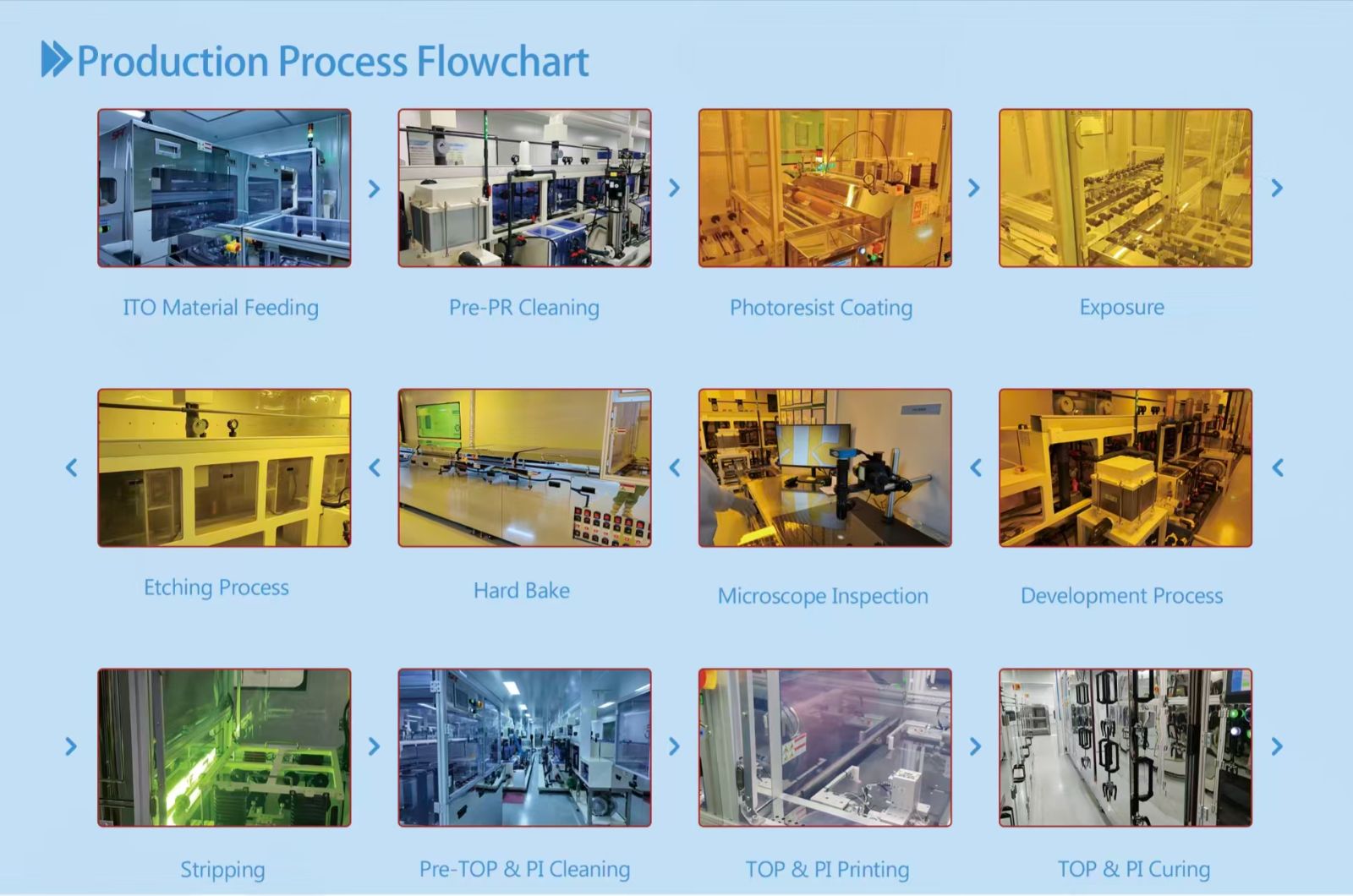
ITO Patterning: Cleaning, Photoresist, Exposure, Etching
ITO is a thin transparent conductive layer on the glass. It forms the electrodes that switch each segment or pixel. The pattern must be exact.
The steps run in this order:
· ITO material feeding: glass enters the line.
· Pre-PR cleaning: removes particles before coating.
· Photoresist coating: applies a light-sensitive film.
· Exposure: transfers the electrode pattern to the film.
· Development: washes away the exposed areas.
· Microscope inspection: checks the pattern early.
· Hard bake: hardens the remaining resist.
· Etching: removes the unwanted ITO.
· Stripping: removes the leftover resist.
Why the microscope check sits before etching matters. A pattern defect caught here costs one plate. A defect caught after assembly costs a whole cell.
Field note: the ITO defects we watch most, and how to catch them early
The rule is simple. Catch defects before etching. A plate that fails at the development stage can be stripped and redone. After etching, it is scrap.
Defect | Typical cause | Early catch |
Open circuit (broken trace) | Particles blocking exposure, resist pinholes, over-developing, scratches | Particle check after cleaning, exposure dose and focus monitoring, pattern check after development |
Bridge or short | Over-exposure, defocus, resist left between lines, dirty photomask | Line-width sampling after exposure, pattern check after development, regular photomask cleaning |
Residue | Incomplete development, weak etching, surface contamination | Compare resist pattern with ITO pattern, filter and change chemicals on schedule |
Misalignment | Thermal expansion, stage drift, dirty alignment marks | Read alignment marks on every plate, stable cleanroom temperature, regular calibration |
Scratches and ESD damage | Debris on rollers or grippers, static charge | Routine roller cleaning, grounding and ion fans in the yellow-light area |
The development stage is the best-value checkpoint. Open lines, bridges, and leftover resist all show up there, before any etchant is used.
Q: How do you trace a defect back to its source?
A: Read the pattern. The same spot on every plate points to the photomask, lens, or nozzle. Random dots point to particles. Broken or bridged lines across a whole plate point to drifting exposure, development, or etching settings. Defects clustered at the edge point to the robot, stage, or air knife.
Alignment Layer: PI Printing, Curing and Rubbing
Liquid crystal molecules need a direction to face. The alignment layer gives it to them.
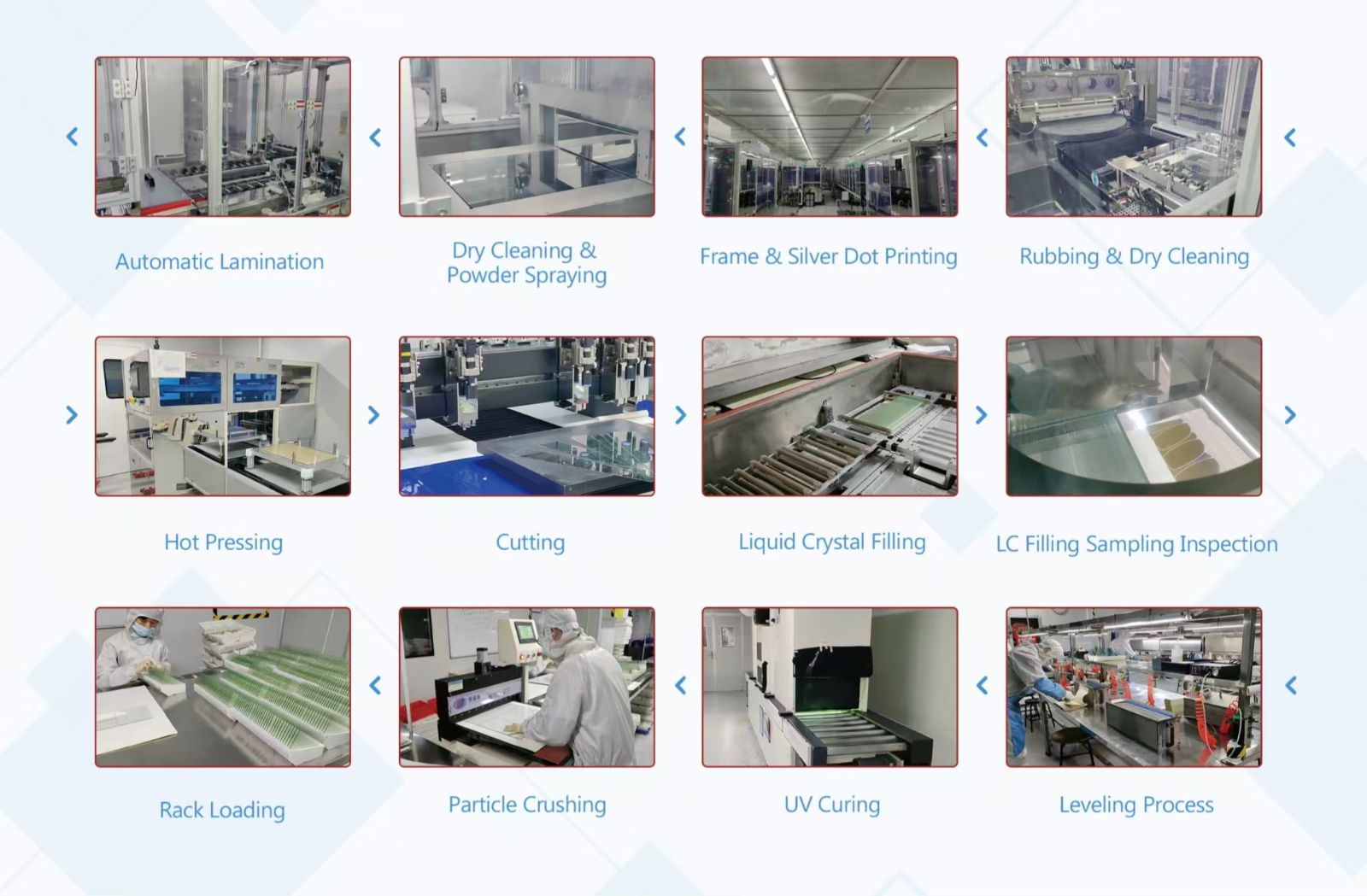
1. Pre-TOP and PI cleaning prepares the surface.
2. TOP and PI printing applies the coating layers.
3. TOP and PI curing sets them under controlled heat.
4. Rubbing and dry cleaning creates the alignment direction and clears debris.
Rubbing is a mechanical step. Consistency matters more than speed. Uneven rubbing shows up later as patchy contrast or poor viewing angle.
Cell Assembly: Sealing, Hot Pressing, Cutting and LC Filling
Now the two plates become one cell.
· Frame and silver dot printing: sealant defines the cell edge. Silver dots connect the top and bottom electrodes.
· Dry cleaning and powder spraying: spacers set the gap between plates.
· Automatic lamination and hot pressing: the plates are aligned and bonded.
· Cutting: large glass is divided into individual cells.
· Liquid crystal filling: material enters the cell gap.
· LC filling sampling inspection: samples confirm the fill.
· Leveling, UV curing, particle crushing, rack loading: the cell is finished and staged for the next stage.
Q: Which cell step affects display quality most?
A: The cell gap. Spacers and pressing control it. Gap changes alter contrast and uniformity.
Industry sources agree on one point. The cell process is widely treated as the most critical step for yield. That is why this stage has its own sampling inspection.
Stage 2: Module Assembly: COB, COG and TFT
A finished cell is not yet a display module. It needs a driver, a connection to your board, and often a backlight or touch panel.
COB vs COG vs TFT Module: What Changes in the Process
The module route depends on the product type. Here is how the three main routes differ.
Item | COB LCD | COG LCD | TFT module |
Driver IC location | On a PCB | Bonded on the glass | On the panel or FPC |
Key process | PCB printing, component placement, AOI | IC bonding, ACF, FPC bonding | Panel loading, bonding, alignment |
Typical profile | Standard thickness | Slim, compact | Depends on backlight and cover |
Best for | Character and graphic displays | Space-limited designs | Color, full graphic UI |
For slim designs, see our COG LCD Display range. For color interfaces, see our TFT Display products.
Our COG and FOG processes cover IC bonding, FPC-to-glass assembly, ACF bonding, adhesive dispensing, pressing, degassing and AOI inspection. The TFT assembly process includes panel loading, bonding, full lamination, backlight integration and automatic alignment.
Film Lamination, Defoaming, Pin Insertion and Touch Integration
The module line follows this order:
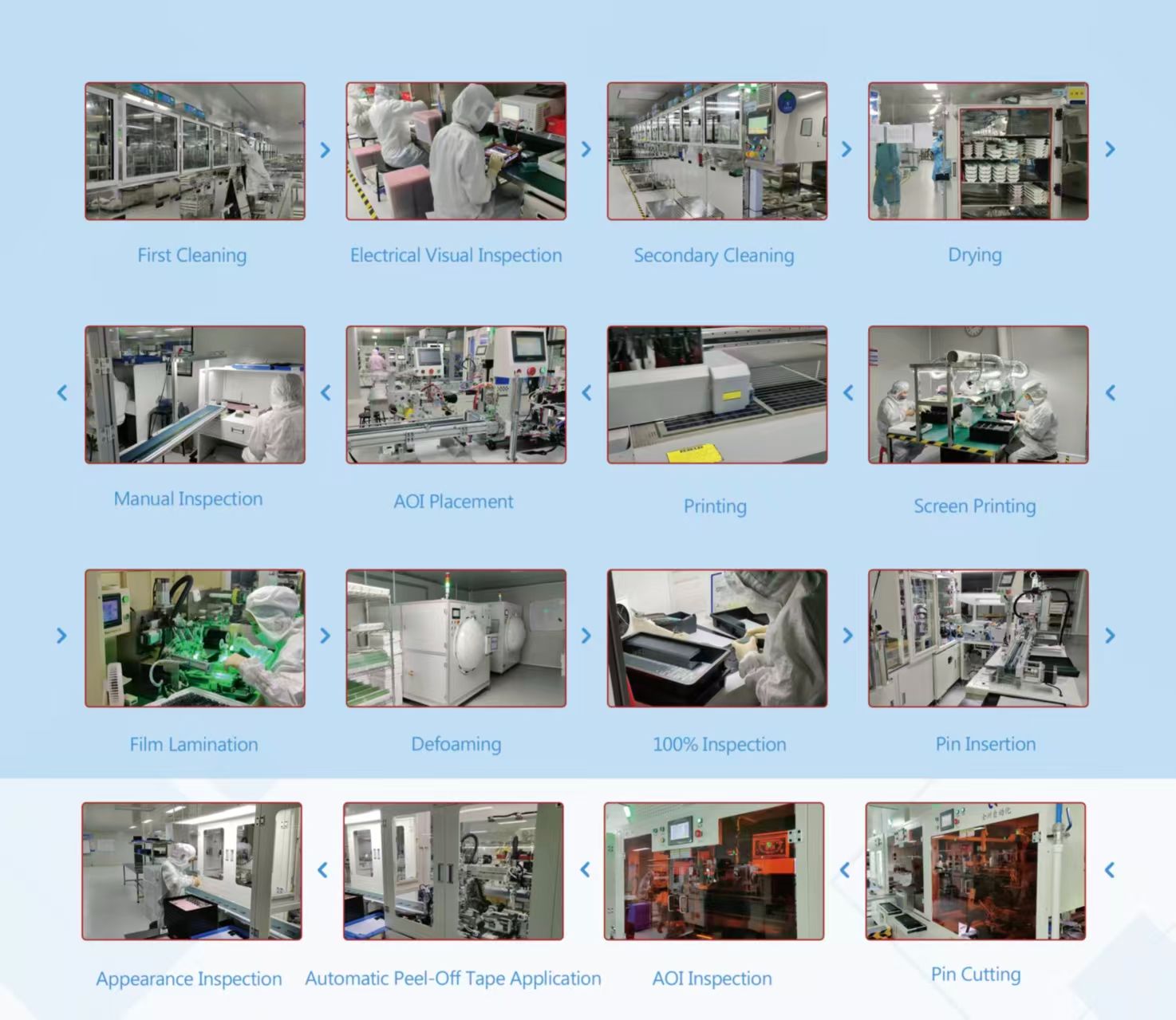
1. First cleaning, electrical visual inspection, secondary cleaning, drying
2. Screen printing, printing, AOI placement
3. Manual inspection
4. Film lamination
5. Defoaming: removes trapped air.
6. 100% inspection
7. Pin insertion and pin cutting
8. AOI inspection
9. Automatic peel-off tape application
10. Appearance inspection and packaging
Defoaming deserves a note. Air bubbles under a film are visible defects. They can also trap moisture. Removing them before final inspection protects both looks and life.
For touch products, full lamination bonds the cover glass or touch panel to the display. It cuts the air gap and helps readability. See our Touch Panel range for options.
Where Quality Is Checked: Inspection Points and Reliability Testing
Good quality control is not one final test. It is many small checks placed where defects start.
Checkpoint | Stage | What it catches |
Microscope inspection | After development | ITO pattern defects |
LC filling sampling inspection | After filling | Fill problems, contamination |
Electrical visual inspection | Start of module line | Open lines, segment faults |
AOI placement and AOI inspection | Module line | Placement and bonding defects |
100% inspection | Before pins | Functional and visual faults |
Appearance inspection | Before packaging | Scratches, stains, particles |
AOI (automated optical inspection) uses cameras and defined rules to find visual defects. It supports other checks. It does not replace electrical or reliability testing.
Reliability testing is a separate layer. We run ten tests on our own equipment:
# | Test equipment | What it checks |
1 | Image measuring instrument | Screen dimensions, measured optically |
2 | Microscope | Foreign particles and debris at the FPC bonding area |
3 | Electric pencil hardness tester | Scratch resistance of the screen surface |
4 | Luminance meter | Brightness, contrast, and uniformity |
5 | Thermal-humidity chamber | Stability under extreme temperature and humidity |
6 | ESD generator | Resistance to electrostatic interference |
7 | Falling ball impact tester | Impact resistance from a ball drop |
8 | Transport vibration shaker | Structural stability under simulated shipping vibration |
9 | Boiling water test | Water resistance by immersion in boiling water |
10 | Salt spray chamber | Corrosion resistance in a salt spray environment |
The list mixes three kinds of checks. Tests 1, 2, and 4 verify the build. Tests 5, 6, 9, and 10 check the environment. Tests 3, 7, and 8 check physical durability.
Not every product needs every test. The right set depends on where the display will work. A fuel dispenser display faces sun, rain, and salt air. An indoor control panel does not.
Packaging is the last step. Modules are sensitive to impact and static. Protective cartons and cushioning keep them safe in transit.
See it in practice. We filmed all ten tests and published the video on YouTube. Watch the Sinda reliability test video. You see each test run on real equipment, not just a line on a datasheet.
What OEM Buyers Should Ask a Display Manufacturer
Knowing the process helps you ask sharper questions. Use this checklist.
1. Do you make the LCD cell, or only assemble modules? This sets your supply-chain risk.
2. Where are the inspection points? Ask for the checkpoints, not a general promise.
3. Which reliability tests fit my environment? Match tests to real operating conditions.
4. Can you change size, FPC, pins, and interface? Confirm what is adjustable and what is fixed.
5. How is long-term supply handled? Stable supply matters as much as the first sample.
Specifications and test results are different things. An operating-temperature range on a datasheet is a design target. A completed test is evidence. Ask for both.
When a standard module does not fit, customization helps. Display type, dimensions, FPC layout, touch panel, and cover glass can often be adjusted. Share your drawing early. It speeds up feasibility review. See how it works on our Custom Solution page.
Sinda Display serves OEMs in fuel dispensers, EV chargers, medical equipment, industrial control, meters, and more. Have a project in mind? Contact our team with your specs.
FAQ
Q: What are the main stages of LCD manufacturing?
A: Three. Glass and cell, module assembly, then inspection and packaging. Large TFT fabs call the first part array and cell.
Q: What is the difference between COG and COB in production?
A: COG bonds the driver IC onto the glass. COB mounts it on a PCB. COG gives a slimmer module. COB uses a PCB-based route.
Q: Which step has the biggest effect on yield?
A: The cell process. Gap control, sealing, and liquid crystal filling all happen here. That is why it gets sampling checks.
Q: Does every display need the same reliability tests?
A: No. Tests follow the use environment. Outdoor and industrial products need more than indoor ones.